
Beincom just supercharged the Lucky Wheel with 2 exciting new features designed for all you Medal grinders chasing monthly airdrop rewards: Convert your BIC into extra spin tickets or double your rewards with the new X2 Reward package!
No more waiting around for daily free spins — now you’re in control. Grab extra spins anytime, boost your Medal stash in minutes, and take your shot at the ultimate prize: up to 200 Medals in a single session.
Ready to spin and win? Let’s dive in!
What’s New with the Lucky Wheel?
If you’ve been active on Beincom, you’re probably already familiar with how Medals work. While Medals aren’t tokens, they play a crucial role on the platform: the more Medals you collect, the bigger your share of the monthly $BIC airdrop.
Currently, you can earn Medals through various activities — completing daily tasks, engaging with the community, inviting friends, ect. Among these, the Lucky Wheel has become a fan favorite. With just one spin, you could win up to 200 Medals, making it one of the fastest ways to level up your Medal count.
That said, spin tickets have always been a bit limited. They’re typically earned through daily missions and referrals, which means you have had to save them up for a big spin session.
To meet growing demand, Beincom has officially launched 2 powerful upgrades to the Lucky Wheel, tailored for users who want to accelerate their Medal collection:
- Exchange $BIC for extra spins
- Upgrade Lucky Wheel and get X2 Rewards for a limited time.
So, if you’re aiming to stack more Medals and claim bigger airdrops, now’s the perfect time to take advantage.
Want to learn how to master Medal collecting and maximize your $BIC rewards? Check out: Beincom Airdrop (BIC Token): Guide to Earning Free Crypto in 2025
Exchange $BIC for Spin Tickets
Tired of waiting for daily tasks or constantly inviting new friends to earn spin tickets? Now you can exchange your $BIC directly for spin tickets — with just a few clicks.
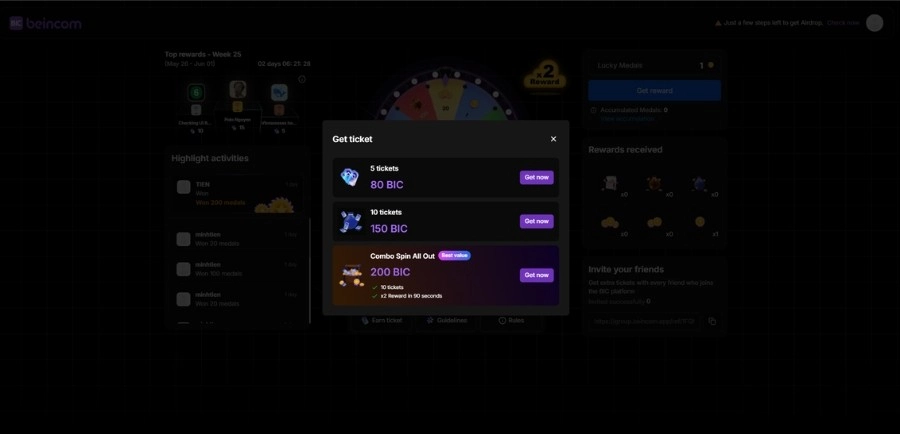
For a single package, you have 2 convenient options:
- 5 tickets
- 10 tickets
Once your transaction is complete, the system will automatically credit your account with the selected number of tickets. You can then use them instantly — either on the website or through the Beincom mobile app, just like usual.
A few things to note:
- Payment is currently supported via web browser on PC and Android only.
- After purchasing, spins can be used on both the Android and iOS apps.
This feature is especially handy for users looking to quickly boost their Medal count — for example, toward the end of an airdrop snapshot when you’re racing to earn more $BIC rewards or climb the leaderboard.
Upgrade Lucky Wheel – X2 Rewards
Already stocked up on spin tickets? Don’t miss the Lucky Wheel Upgrade, which gives you X2 rewards for every spin made within 90 seconds.
Once started, a countdown timer will appear right on the “Spin” button — and any rewards you land during that window will be instantly doubled.
For example: Spin and win 100 Medals? You’ll get 200 Medals instead!
A few things to keep in mind:
- The X2 bonus only applies to spins made within 90 seconds of activation.
- You can’t purchase another X2 package until the current one is used.
- Once started, the timer can’t be paused or canceled — make sure you’re ready before you hit go!
Getting started is easy:
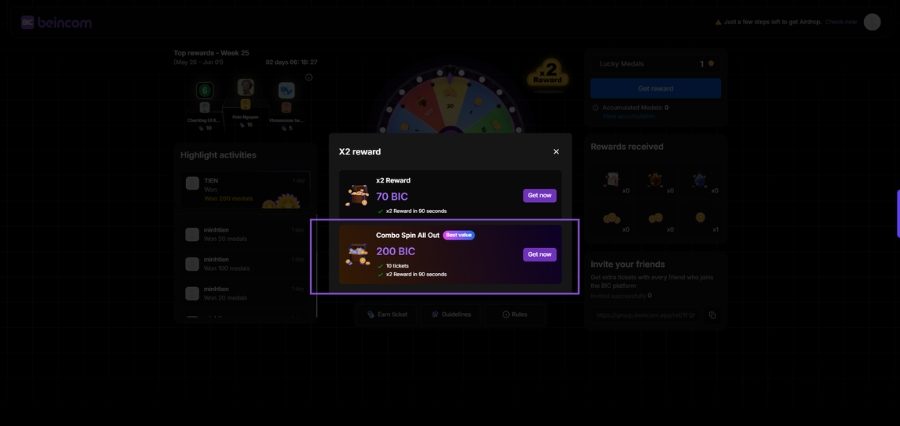
- Purchase a X2 Reward upgrade or the Combo Package (10 tickets + X2 Rewards).
- Tap Start X2 → Confirm → And get ready to spin big.
Pro tip: The “Combo Spin All Out” is the best value if you’re serious about farming Medals fast. It includes 10 tickets + the X2 bonus at a special discounted rate.
How to Exchange BIC for Spin Tickets or Upgrade Lucky Wheel
At the moment, payments for Lucky Wheel upgrades are only supported via web browsers on PC and Android. Once your transaction is complete, you can use your spin tickets and activate the X2 reward boost directly on the BIC Group app, including on iOS.
Here’s how to get started:
Step 1:
Open the Lucky Wheel through the app icon or click the shortcut [here].
Step 2:
Tap “Add” to explore spin ticket packages and combo bundles (including X2 Rewards).
Or go straight to the “X2 Reward” section if you’re only looking to activate the multiplier.
Step 3:
Choose the package you want → tap Get Now → you’ll be redirected to the payment page.
Step 4:
Confirm the payment → Enter your BIC Wallet password → Hit Confirm to complete.
Your transaction will be processed in 2–3 minutes. Once successful, you’ll get a confirmation right on the Lucky Wheel page, in your BIC Group app notifications, and via your registered Beincom email.
And just like that — you’re ready to spin, stack Medals, and boost your $BIC airdrop potential!
Pro Tips to Maximize Your Spins
Want to make the most of your Lucky Wheel sessions and stack more $BIC? Here are a few smart tips to keep in mind:
- Save up before going X2 Reward: Don’t activate the X2 Reward boost if you only have 1–2 spins. Instead, gather 10–20 tickets first, then hit the boost to make the most of your 90 golden seconds.
- Stable connection is key: That countdown is real! Make sure you’re in a spot with a strong, stable internet connection. Every second counts — and you don’t want to miss out due to a lag.
Don’t miss your chance to level up Lucky Wheel and maximize your airdrop rewards. Try your luck — the upgraded way — today!