
Want to receive free BIC Tokens every month through the 5-year BIC Airdrop? Then verifying your identity (KYC) is a must to unlock this benefit—alongside the other basic requirement: activating your BIC Wallet.
In the Web3 world where privacy is highly valued, KYC can feel like a psychological barrier for many users. However, on Beincom, KYC is not just a mandatory procedure. It’s a crucial step to protect user assets, ensure fairness, and build a truly high-quality community.
Whether you’re a complete beginner or someone who’s already activated your wallet but still hesitant about the verification step, this guide will walk you through KYC on Beincom from A to Z—clearing all your doubts and getting you ready for massive airdrops.
New to the project? Learn more here: What is BIC Token? All About Beincom Project
What Is KYC? Why Does Beincom Require It?
KYC (Know Your Customer) is the process of verifying a user’s identity—typically through valid identification documents such as a national ID card or passport. In both traditional finance and modern Web3 ecosystems, KYC serves several essential purposes:
- Ensures that users are real individuals—not bots, clones, or fake accounts
- Prevents fraud, abuse, and manipulation of reward programs like Airdrops
- Enhances the protection of personal assets and accounts against risks like identity theft or unauthorized access
So why does Beincom implement KYC?
Unlike many Web3 projects that burn money on a one-time airdrop and then disappear, Beincom is building a long-term Airdrop program that lasts 60 months—with the goal of fairly distributing value to a genuinely engaged community.
Requiring KYC on Beincom helps ensure that:
- Each person can only claim rewards with one legitimate account
- Spam, clone farming, and medal abuse via bots or shady tactics are prevented
- A transparent, responsible, and trustworthy community is fostered—especially important as users can earn money, trade assets, and build reputation on the platform
Beincom only asks for the minimum information necessary to verify your identity. Your data is strictly protected under a robust Privacy Policy, and no third party has access to your information.
KYC is not a loss of privacy—it’s how you protect your own rights in a growing and sustainable ecosystem.
Learn more: Why Long-Term Holders Win More from BIC Airdrop
What You Need to Prepare Before Starting KYC on Beincom
To ensure a smooth KYC process, make sure you have the following ready:
1. A Valid Identification Document
For international users, Beincom recommends using a passport for identity verification, as it provides the highest compatibility and success rate.
Note: If your document cannot be verified automatically, you will be directed to complete manual KYC via support form.
2. A Mobile Device with a Working Camera
KYC is currently supported only via the mobile app, not through browsers. Ensure your device has a clear, functional camera—free of blur or hardware issues.
3. Stable Internet Connection and Good Lighting
Avoid face or document scanning errors by:
- Using a stable network connection
- Standing in a well-lit area (preferably with natural light or strong indoor lighting)
- Holding your phone steady and keeping documents visible
If done correctly, the entire KYC process takes just a few minutes. In case your verification fails, you’ll be guided through a manual KYC process using a support form.
How to Complete KYC on Beincom via the Mobile App (BIC Group)
Normally, to proceed with KYC on Beincom, your account must be upgraded to one of the following plans: KYC / Annual Premium / Lifetime Premium.
HOT: You can now unlock the KYC package for free by simply activating your BIC Wallet and downloading the BIC Group app. Sign up now!

Step 1: Access the KYC Feature
- Open the BIC Group app on your smartphone. Don’t have the app yet? Download it here: CH Play | App Store
- Go to Profile
- Tap the Verify Now button
Note: If you can’t find the Beincom app on the store, you can try downloading it here: Android | iOS
Step 2: Start the Identity Verification Process
- Read and agree to the Privacy Policy & Terms
- Tap Start
Step 3: Capture Your ID Document
- Select your ID type: Passport – recommended for international users.
- Tap Open Camera and allow camera access if prompted
- Capture both front and back of your document. Make sure images are clear, not blurry, not overexposed, and not cropped
- Review and confirm your information, then tap Continue.
Step 4: Facial Verification
- Align your face in the center of the frame
- Gently move your head as instructed by the system
- If your face does not match the photo on your ID, tap Retake to try again
Important: If you’ve tried face verification multiple times without success, please stop and record a short video to send to the Admin Team for support. Avoid exceeding the allowed number of attempts.
Once the system successfully verifies your face, you’ll receive a confirmation that your account is verified.
What If Verification Fails or Your Info Is Incorrect?
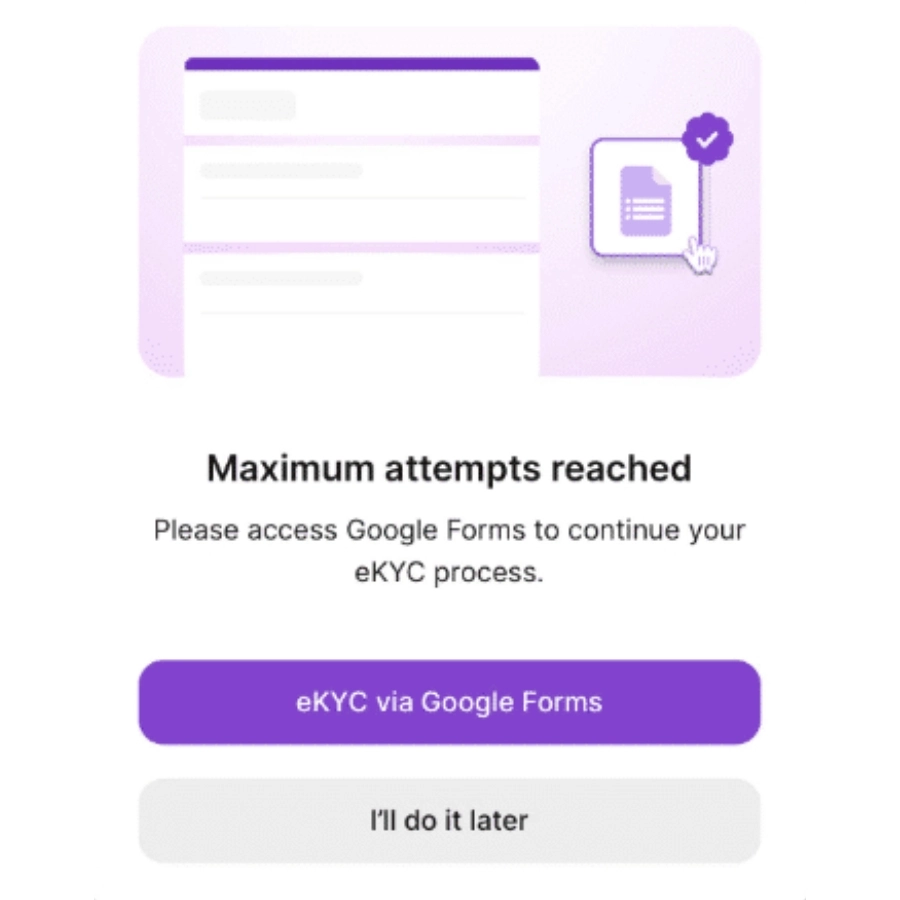
- If you reach the maximum number of attempts:
→ Choose the Google Form KYC option and submit your information.
Due to high daily volume, please be patient while our team reviews and verifies your submission.
- If your info is incorrect after successful verification:
→ Log in to Gmail and fill out the correction request form provided by the platform.
Once your KYC is approved, your account will display a purple verification checkmark and your real name as verified from your ID document.
You can also view a visual step-by-step guide below:
Manual KYC via Google Form
If you’re unable to complete identity verification (KYC) through the mobile app—due to technical issues, exceeding the allowed number of attempts, or being an international user without a Vietnamese Citizen Identity Card—Beincom offers a manual KYC option to ensure you can still qualify for Airdrops and protect your Web3 assets.
When Should You Use the Manual KYC Option?
- You’ve attempted eKYC multiple times but failed and reached the maximum number of verification attempts
- Your ID photo or facial scan cannot be correctly recognized by the system
- You are an international user using a passport or visa
Important Notes Before Submitting the Manual KYC Form
- This option is only available to users who have upgraded their accounts (KYC Plan or higher).
- Before filling out the form, make sure your date of birth and gender on the BIC App match the information on your identification document.
- Processing time: 3–5 business days (excluding weekends and Vietnamese public holidays).
- The system requires you to log in with your Gmail account to submit the form and verify your identity.
Information You Need to Prepare
The form has 2 sections. Please prepare and submit the following:
Account Information:
- Full name (must match exactly as shown on your ID document)
- Email address used to register your Beincom account
- Your Beincom username (e.g. @username)
- Phone number
Attached Images:
- A clear photo of your identification document:
- Front and back of your Citizen Identity Card, or
- Full page of your Passport
- A selfie holding your ID document, clearly showing your face and the document for identity comparison
Once you submit the form, you’ll receive a confirmation email when your manual KYC is successfully verified.
Your account will then be updated with a “KYC Verified” status, making you eligible for Airdrop participation and access to all advanced platform features.
Access the form here: Manual KYC Verification
What to Do After Successfully Completing KYC
Once you complete the KYC process—whether through automated eKYC or manual verification—your Beincom account will be updated as follows:
- A purple checkmark will appear next to your profile name, and a blue checkmark for any sub-profiles.
- Your display name will be updated to match your legal name on the verified document
- Your profile will show the status “Verified”
So, What Should You Do Next?
Stay Tuned with Monthly Airdrop Requirements
Beincom distributes 5 million BIC Tokens every month through its 60-month Airdrop program (totaling 300M BIC). While KYC and BIC Wallet activation are the core eligibility requirements, other conditions may vary from round to round, such as:
- Logging in 7 consecutive days
- Participating in quizzes or community missions
- Inviting friends or engaging in platform activities
To stay eligible, be sure to follow updates from Beincom’s official channels—including X (Twitter), the official BIC Token website, and especially the Beincom Global Community.
Make the Most of Your Verified Account
With your account verified, you unlock a wide range of key benefits:
- Guaranteed eligibility for BIC Airdrops
- Enhanced trust and credibility within the community
- Secure access to advanced features like Donate
- Full participation in reward programs and exclusive events
- Priority support and asset protection in case of issues—verified accounts receive faster and more comprehensive help

Complete Your KYC Today to Unlock Airdrop and Join the SocialFi Revolution Journey with Beincom
KYC isn’t just an identity check—it’s your gateway to unlocking the full potential of Beincom. From earning monthly BIC Token Airdrops to receiving Donate support for your creative work, everything starts with verification.
Airdrop 3/60 has just ended – and Airdrop 4/60 is right around the corner. This month, qualifying is easier than ever. You only need to:
- Complete KYC verification
- Activate BIC Wallet
Don’t wait—just a few minutes of your time can officially launch you into the Web3 world with the Beincom ecosystem: safer, more transparent, and full of opportunities to earn meaningful rewards for your contributions.
Haven’t completed KYC yet? Open the app and get verified now.
Not on Beincom yet? Download the app, sign up, activate your wallet, and complete KYC so you don’t miss the upcoming Airdrop.